Arizona HIPAA Colocation: Secure Compliant Hosting, Phoenix.

Arizona’s regulated organizations need hosting that pairs local performance with ironclad compliance. Whether you run a medical practice, a dental group, a regional clinic network, or a healthcare SaaS product, keeping protected health information secure and available is nonnegotiable. Here’s how regional colocation in Phoenix solves latency, control, and compliance pain points.
In this guide you’ll learn practical steps for selecting and operating an Arizona HIPAA colocation solution, how colocation supports HIPAA and SOC 2 objectives, and why local managed services and 24/7 support matter when patient care and compliance are on the line. I’ll also show how to secure remote desktops, manage Microsoft 365 safely, and harden WordPress sites used by health organizations.
Why choose Arizona colocation for HIPAA workloads

Choosing a local colocation provider in Arizona delivers three practical benefits for HIPAA environments:
- Low latency and predictable performance for multi-location clinics and telehealth, because infrastructure sits near your users.
- Direct physical control over hardware, allowing strict access logs, chaining of custody, and onsite audits that auditors appreciate.
- Easier coordination with local managed services and emergency response, including on-site technicians and same-day hardware swaps.
Colocation is not a one-size-fits-all substitute for a complete compliance program, but it’s a powerful foundation. When combined with managed services like Managed Virtual Desktops (VDI), Microsoft 365 management, and email security, it creates an environment that meets technical safeguards under the HIPAA Security Rule and supports administrative and physical safeguards.
Key compliance and security features to require
When evaluating Arizona HIPAA colocation, verify these capabilities and controls:
Physical security and access controls
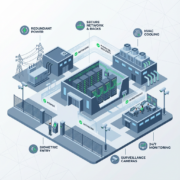
- 24/7 security guards, biometric access controls, and CCTV with retention policies.
- Logged access records and escort policies for non-authorized visitors.
Network segmentation and encryption
- Private VLANs, strong firewall rules, and inbound/outbound filtering.
- TLS for in-transit data and full-disk or volume-level encryption for data at rest.
Monitoring, logging, and incident response
- Continuous monitoring, SIEM feeds, and retained logs for 6 months or longer.
- Documented incident response playbooks and 24/7 SOC or NOC support.
Compliance support and documentation
- Willingness to sign a Business Associate Agreement (BAA) and provide SOC 2 or other compliance artifacts.
- Assistance with security assessments, penetration testing, and audit readiness.
How colocation supports HIPAA controls in practice
- Risk assessment: Physical and environmental controls reduce threats to availability and integrity.
- Access control: Local control of keycards and server access complements logical access policies for PHI.
- Backup and recovery: Off-site replication and tested disaster recovery reduce downtime risk—vital for patient care continuity.
Managed services that complement HIPAA colocation
Pairing colocation with managed offerings closes operational gaps and reduces vendor sprawl. Consider these services:
- Managed Virtual Desktops (VDI) to centralize PHI access and prevent local data sprawl. Learn more about Managed Virtual Desktops (VDI).
- Managed Microsoft 365 Services to enforce conditional access, DLP, and secure Teams/Exchange workflows. Explore Managed Microsoft 365 Services.
- Compliant M365 Email Service and Email Security & Encryption to stop phishing and protect ePHI-in-transit. See Compliant M365 Email Service and Email Security & Encryption.
- Secure WordPress Hosting for patient portals or informational sites that must avoid data exposure. See Secure WordPress Hosting.
These managed layers reduce the burden on in-house teams and make audits simpler, because configurations and evidence are handled by experienced professionals.
How to secure remote desktops and VDI for HIPAA
- Enforce multi-factor authentication and conditional access tied to device posture.
- Use enforced, centrally managed profiles and block clipboard/file redirection where PHI is involved.
- Maintain session logging and periodic snapshot backups of user environments.
- Apply strict host hardening, baseline images, and frequent vulnerability scanning.
Managing Microsoft 365 safely for healthcare
- Sign a BAA with your Microsoft 365 and service providers.
- Deploy Microsoft Purview Data Loss Prevention policies for ePHI and restrict external sharing.
- Use retention labels and eDiscovery policies to preserve audit trails.
- Enforce device compliance using Intune and conditional access.
Preventing email threats and protecting PHI
- Use advanced email filtering and URL rewriting to stop credential phishing.
- Deploy email encryption for PHI exchanges and train staff on reporting suspicious messages.
- Implement role-based access and least privilege across mailboxes containing PHI.
FAQs
What is Arizona HIPAA colocation and how is it different from cloud hosting?
Arizona HIPAA colocation places your physical servers in a Phoenix data center that meets security and compliance standards. You retain hardware control and can pair colocation with managed services, while cloud hosting typically means shared multi-tenant infrastructure managed by a public provider.
Can I sign a BAA with a colocation provider?
Yes, reputable colocation providers that serve healthcare customers will sign a Business Associate Agreement, and they should provide supporting compliance documents like SOC 2 reports.
How does colocation help with HIPAA audits?
Colocation centralizes physical controls, gives auditors direct visibility into access logs and security procedures, and simplifies evidence collection for environmental safeguards and physical access policies.
Is VDI required for HIPAA compliance?
VDI is not required, but it is a strong technical control that reduces data sprawl, improves session logging, and centralizes patching and endpoint protection, which helps meet HIPAA technical safeguards.
How do I back up PHI in a colocation environment?
Implement encrypted backups with off-site replication to a separate AZ or cloud region, maintain immutable backup copies where possible, and test restores regularly as part of your DR plan.
Summary
Arizona HIPAA colocation gives regulated organizations a high-performance, locally managed foundation that supports HIPAA technical, physical, and administrative safeguards. When combined with managed VDI, Microsoft 365 services, email security, and secure WordPress hosting, colocation helps reduce audit friction and improves operational resilience.
Next steps for Phoenix-based healthcare and regulated organizations
If you need a partner that knows HIPAA, local data center operations, and how to run secure managed services, Armour Cloud provides Arizona-based colocation and compliance-focused managed hosting. Call (602) 529-3435 for secure hosting or compliance support.
Learn more about Colocation at https://armourcloud.io/colocation/ and explore our HIPAA Compliant Managed Cloud Hosting at https://armourcloud.io/hipaa-compliant-cloud-hosting/. For virtual desktops and remote access options, see our Managed Virtual Desktops (VDI) page at https://armourcloud.io/virtual-desktops/.
Conclusion
Choosing Arizona HIPAA colocation is about control, locality, and compliance readiness. It gives you on-the-ground performance, easier audits, and a tighter security posture when paired with managed services. If uptime, HIPAA controls, and responsive local support matter, colocation in Phoenix with a managed provider is a practical, auditable choice.
About Armour Cloud
Armour Cloud is a Phoenix-based provider of secure, compliant cloud hosting and managed IT solutions for regulated industries. Armour Cloud delivers high-performance infrastructure built on Arizona data centers, offering low-latency, HIPAA-compliant hosting with 24/7 support.
We specialize in helping healthcare, finance, and legal organizations protect sensitive data, meet compliance requirements, and modernize their IT with scalable, managed cloud environments.
Our Top Services:
- Colocation
- Managed Desktop-as-a-Service (VDI)
- Managed Microsoft 365 Services
- Email Security & Encryption
- Secure WordPress Hosting
- Private Cloud Hosting
- HIPAA Compliant Cloud Solutions
Ready to Secure Your Cloud?
📞 Call (602) 529-3435 or Contact Armour Cloud to get started with a free consultation.