Microsoft 365 Security Checklist for SOC 2 Phoenix Guide Hub
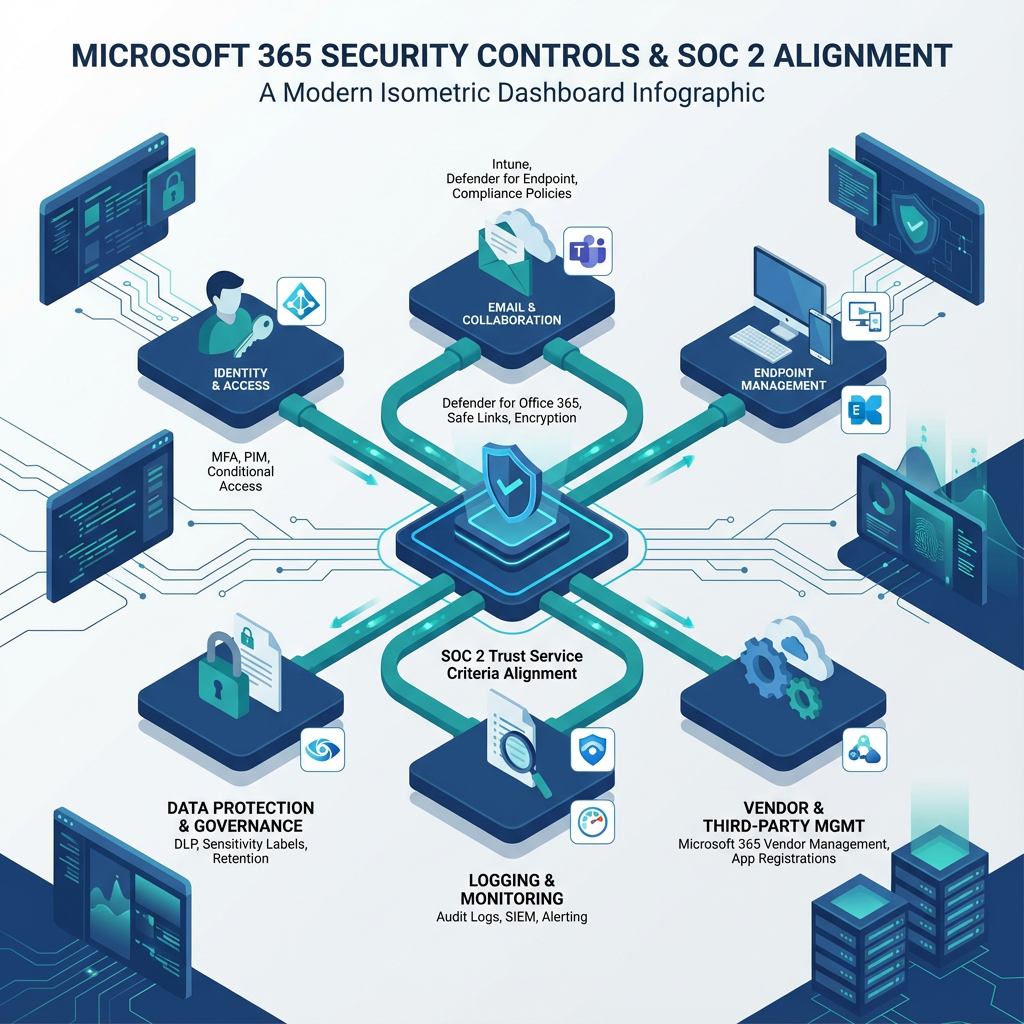
Every SOC 2 audit starts with a practical, repeatable security program you can prove to auditors and stakeholders. If your organization runs Microsoft 365, you need a targeted checklist that closes technical gaps, documents controls, and supports evidence collection for SOC 2 reporting. In this guide you'll find an actionable Microsoft 365 checklist mapped to SOC 2 principles, control examples, and implementation tips you can use today.
microsoft 365 security checklist for soc 2 should be treated as both policy and configuration work. That means pairing written policies, role-based responsibilities, and regular evidence capture with technical settings like multi-factor authentication, conditional access, data loss prevention, and logging.
Why this checklist matters
SOC 2 assesses security, availability, processing integrity, confidentiality, and privacy. Microsoft 365 is often core to business productivity and data processing, so auditors expect clear controls around identity, access, data protection, monitoring, and vendor oversight. Use this checklist to reduce audit friction, shorten evidence-gathering cycles, and tighten day-to-day security.
Microsoft 365 security checklist for SOC 2: core controls
Identity and access management
- Enforce Multi-Factor Authentication (MFA) for all admin and user accounts. Require modern authentication only.
- Implement Conditional Access policies to restrict access by risk, location, and device posture.
- Use role-based access control, with just-in-time permissions for privileged roles. Document approval workflows for admin access.
Endpoint and device security
- Enroll devices in Microsoft Intune or equivalent MDM to enforce encryption, OS patching, and baseline posture.
- Apply device compliance policies and block unmanaged devices from accessing sensitive services.
Data protection and governance
- Configure Microsoft Purview Data Loss Prevention policies for sensitive data patterns relevant to your industry, like PHI or financial data.
- Apply sensitivity labels and automatic encryption for high-risk content.
- Implement retention and disposal policies so data lifecycle aligns with legal and SOC 2 requirements.
Email security and anti-phishing
- Enable Microsoft Defender for Office 365 protections: Safe Links, Safe Attachments, anti-phishing and spoof intelligence.
- Configure DKIM, DMARC, and SPF for all sending domains.
- Route sensitive or regulated email through your compliant email flow and consider encryption for external transmission.
Logging, monitoring, and alerting
- Enable unified audit logging and retain logs long enough to meet evidence and incident investigation requirements.
- Integrate logs with a SIEM for real-time alerts and historical analysis.
- Define and test incident detection, response, and escalation playbooks.
Backup and recovery
- Ensure mailbox and SharePoint/OneDrive content is captured in a separate backup solution, with tested restore procedures.
- Maintain recovery RPO/RTO targets and document test results for auditors.
Vendor and third-party controls
- Inventory connected third-party apps and consent permissions in the tenant.
- Enforce app consent policies and periodic review of OAuth permissions.
- Maintain vendor questionnaires and SOC reports for third parties that access sensitive data.
Policy, training, and evidence
- Publish acceptable use, access control, and data classification policies.
- Run mandatory security awareness training with phishing simulations.
- Schedule quarterly evidence collection: screenshots of settings, exported logs, policy versions, and training completion reports.
Implementation checklist, step-by-step
- Baseline discovery: export current Azure AD, Exchange, SharePoint, Teams, and Intune settings. Document gaps.
- Identity hardening: enforce MFA, implement Conditional Access, and remove legacy auth.
- Protect data: label sensitive data, enable DLP policies, and set retention.
- Secure email: enable Defender for Office 365 protections, configure SPF/DKIM/DMARC.
- Logging and backups: enable audit logs, forward to SIEM, and validate backups.
- Policies and evidence: centralize policy documents, schedule automated reports and periodic audits.
Mapping controls to SOC 2 trust service criteria
- Security: MFA, conditional access, endpoint management.
- Availability: backup and disaster recovery testing, Service Level Agreements.
- Processing integrity: change management around Exchange and SharePoint configurations.
- Confidentiality and privacy: DLP, sensitivity labels, encryption at rest and in transit, access reviews.
Practical tips and pitfalls
- Start with Microsoft Secure Score to prioritize high-impact controls. Visit Microsoft Secure Score documentation for baseline recommendations.
- Don’t rely on default retention or sharing settings. Customize governance to reflect regulated data categories.
- Evidence matters more than intent. Automate reporting and store exports in a secure evidence repository.
Implementation tools and Armour Cloud services
Armour Cloud offers hands-on support for Managed Microsoft 365 Services, compliant email routing, and secure virtual desktops. If you need help implementing tenant hardening, data governance, or auditing readiness, our Managed Microsoft 365 Services team can work with you. Explore our Compliant M365 Email Service for secure mail flow and our Email Security & Encryption options to reduce audit risk. For hybrid or private options consider Private Cloud Hosting and Managed Virtual Desktops (VDI) to isolate sensitive workloads.
FAQs
What are the minimum Microsoft 365 settings SOC 2 auditors expect?
Auditors expect strong identity controls like MFA and conditional access, unified logging, documented data protection policies, retention and backup procedures, and proof of regular access reviews.
How long should I retain Microsoft 365 logs for SOC 2?
Retention depends on your control objectives and contract requirements, but common practice is 1 to 3 years for audit and investigation purposes. Document retention policy and justify any shorter periods.
Can Defender for Office 365 satisfy SOC 2 email controls?
Defender provides essential protections, but SOC 2 requires documented controls, monitoring, and evidence of configuration. Combine Defender with DKIM/DMARC/SPF and email encryption for stronger coverage.
How do I prove least privilege for Microsoft 365 administrators?
Maintain role-based access records, change logs, and approval tickets for privilege grants. Use just-in-time admin elevation and export Azure AD PIM reports as evidence.
Do I need a separate backup for Microsoft 365 data?
Yes, native retention and recycle bins are not substitutes for a dedicated backup with tested restores. Auditors want demonstrated recovery capability.
How often should I test incident response for M365 incidents?
Quarterly tabletop exercises and annual full technical drills are common. Document outcomes and remediation steps.
Summary
This Microsoft 365 security checklist for SOC 2 gives you a repeatable roadmap: harden identity, protect data, secure email, collect and retain logs, and prove controls with documented evidence. Start with discovery, prioritize high-impact controls, and automate evidence collection to reduce audit friction.
Ready to accelerate your SOC 2 readiness?
If you want a partner to implement these controls, Armour Cloud can help. Call (602) 529-3435 or request a consultation at https://armourcloud.io/contact/. Explore our Managed Microsoft 365 Services and Compliant M365 Email Service to speed your audit timeline.
About Armour Cloud
Armour Cloud is a Phoenix-based provider of secure, compliant cloud hosting and managed IT solutions for regulated industries. Armour Cloud delivers high-performance infrastructure built on Arizona data centers, offering low-latency, HIPAA-compliant hosting with 24/7 support.
We specialize in helping healthcare, finance, and legal organizations protect sensitive data, meet compliance requirements, and modernize their IT with scalable, managed cloud environments.
Our Top Services:
- Colocation
- Managed Desktop-as-a-Service (VDI)
- Managed Microsoft 365 Services
- Email Security & Encryption
- Secure WordPress Hosting
- Private Cloud Hosting
- HIPAA Compliant Cloud Solutions
Ready to Secure Your Cloud?
📞 Call (602) 529-3435 or Contact Armour Cloud to get started with a free consultation.