Improve WordPress Security Without Plugins, Practical Guide.

WordPress is powerful, but out-of-the-box sites can be fragile if you only rely on plugins. You can dramatically reduce risk by applying server and configuration hardening, secure operational processes, and a managed hosting approach that enforces security at the platform level. In this article I show practical, low-maintenance ways to Improve WordPress Security Without Plugins while keeping uptime, compliance, and performance front of mind.

Why secure WordPress at the server level
Relying only on plugins leaves you exposed to plugin vulnerabilities, update regressions, and plugin bloat that affects performance. Platform-level controls shift security away from fragile site tooling, and give you consistent protections across every site you host. For regulated organizations, server hardening and managed hosting reduce compliance overhead, create reliable backups, and help meet HIPAA and SOC 2 requirements with less custom work.
Quick checklist: non-plugin security controls you can implement today
- Enforce HTTPS and HSTS at the web server or load balancer, not with a plugin.
- Keep PHP and system packages patched, and use actively supported PHP versions.
- Use SSH key authentication and SFTP for file access, disable weak FTP.
- Set strict file permissions, prevent world-writeable files, and protect wp-config.php.
- Disable PHP execution in upload directories via web server rules.
- Block or harden xmlrpc.php and wp-admin access by IP, when feasible.
- Enable automatic core updates via wp-config.php if you prefer unattended patching.
- Use server-level WAF and DDoS mitigation provided by your host.
- Schedule daily snapshots and off-site backups that are retention-aware.
Server and configuration hardening, step by step
Enforce TLS and redirect at the edge
Configure your load balancer or reverse proxy to terminate TLS, redirect HTTP to HTTPS, and add HSTS headers. Let the data center or managed edge enforce TLS certificates, so every site benefits without plugin dependencies.
Lock down file permissions and wp-config.php
Set ownership to the web server user, use 640 or 600 permissions for wp-config.php, and 644 for most files. Move wp-config.php one level above the web root when possible, and deny read access to it from the web server if your host supports it.
Disable PHP execution in uploads
Add web server rules to block PHP execution inside /wp-content/uploads, reducing the risk of an uploaded backdoor being executed. This is a simple rewrite rule on Apache or Nginx, and prevents many common attacks.
Turn off the built-in file editor
Define DISALLOW_FILE_EDIT true in wp-config.php to prevent editing theme and plugin code through the admin UI. This small change prevents attackers from using admin accounts to inject code.
Harden logins without a plugin
Use server-side rate limiting, fail2ban, or web application firewall rules to throttle repeated login attempts. Where possible enforce MFA at the authentication provider or single sign-on layer so WordPress credentials are not the single factor for access.
Disable or restrict XML-RPC
If you do not use remote publishing, deny access to xmlrpc.php at the web server. If you need it for valid services, place it behind stricter IP or token-based controls.
Enforce strong database credentials and least privilege
Use a dedicated database user with only necessary privileges, rotate credentials regularly, and avoid using the root database user. Consider moving the DB to a private network segment with firewall rules.
Use WP-CLI and scheduled integrity checks
Automate core updates and file integrity verification using WP-CLI and cron jobs run on the server. A checksum comparison against official WordPress releases catches injected or modified core files quickly.
Operational practices that minimize risk
Automated, tested backups and a recovery plan
Platform snapshots plus off-site backups protect you from ransomware and accidental deletion. Maintain a tested restore process and document RTO and RPO targets for compliance.
Staging and change management
Use a staging environment, test updates and code changes, then promote to production with a rollback plan. This prevents unexpected outages during plugin or core updates.
Apply the principle of least privilege
Give users only the roles they need in WordPress, and restrict SSH or control-panel access to named administrators. Use centralized identity providers or SSO for easier audit trails.
Monitoring, logging, and alerting
Ship logs to a centralized service, monitor for anomalous file changes, and set alerts for unexpected spikes in 500 errors or authentication failures. Host-managed monitoring saves time and offers 24/7 coverage for critical sites.
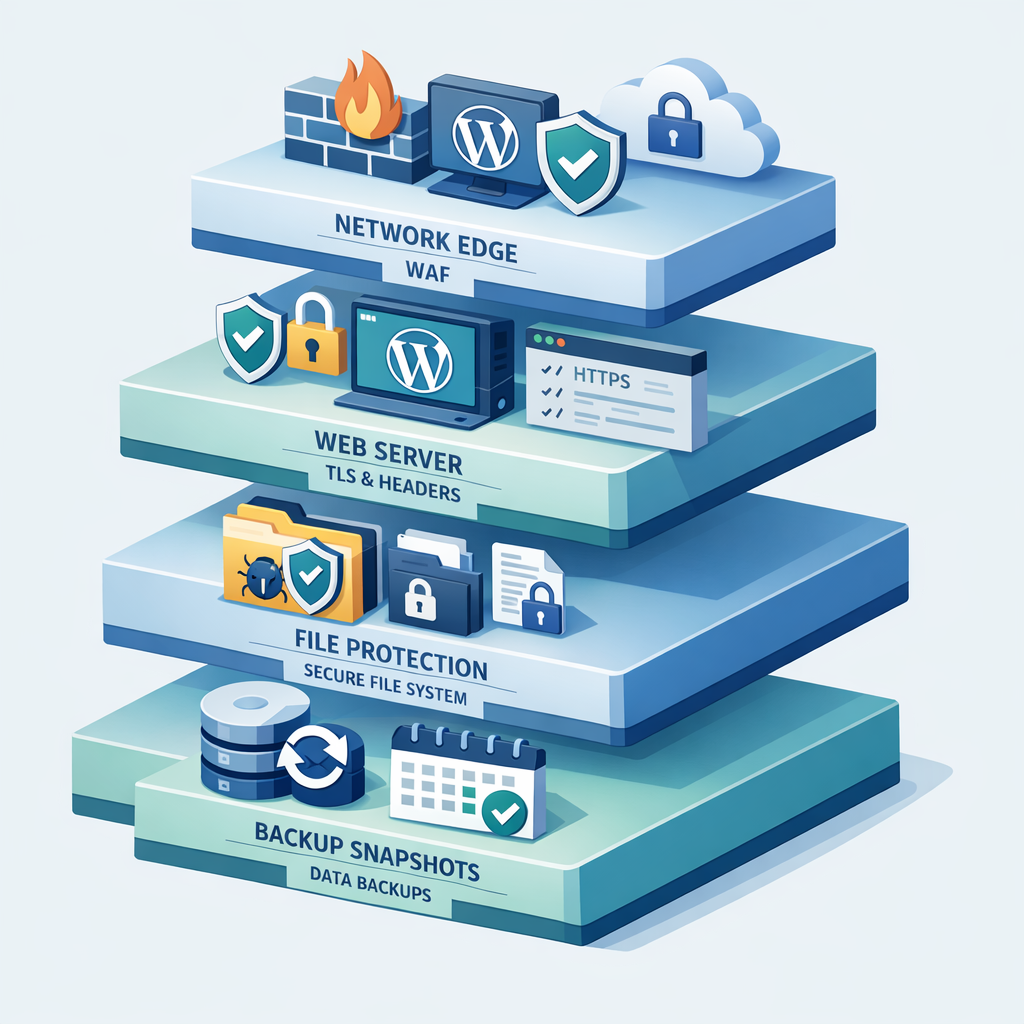
Platform-level protections to demand from your host
- Managed WAF and DDoS protection that filters threats before they reach your site.
- Automated daily backups with versioning and secure off-site replication.
- Hardened LAMP/LEMP stacks, timely patching, and supported PHP versions.
- SFTP/SSH with key management and optional isolated containers for tenants.
- Logging retention policies and assistance with compliance evidence for HIPAA and SOC 2.
Armour Cloud provides secure managed WordPress hosting and enterprise-grade server controls, so organizations get platform-level defenses without relying on a plugin stack. Learn more about Secure WordPress Hosting and Managed Microsoft 365 Services for identity and email protections.
FAQs
Can I secure WordPress without plugins entirely?
Yes, many core protections are best applied at the server and operational level. Combine server hardening, strong processes, managed backups, and a WAF to significantly lower risk while minimizing plugin use.
How do I enforce HTTPS without a plugin?
Configure HTTPS termination at your load balancer or reverse proxy, enable HSTS headers at the web server, and install TLS certificates at the platform level. Your host can manage certificates automatically.
Will moving wp-config.php improve security?
Moving wp-config.php one level above the web root reduces exposure. Combined with strict file permissions it adds meaningful protection, though it should complement other hardening steps.
How do I disable XML-RPC safely?
If you do not use remote publishing or Jetpack features that require XML-RPC, block requests to xmlrpc.php at the web server. If you need it, restrict access by IP or token.
Should I use automatic core updates?
Automatic updates reduce exposure to known vulnerabilities, but for complex sites consider staged automatic updates with a rollback plan so you can test functionality before broad deployment.
Get professional help to remove guesswork
If your site hosts regulated data or you need predictable compliance, platform-level security and managed services remove a lot of operational risk. Armour Cloud offers HIPAA-compliant and SOC 2-aligned hosting, daily backups, managed WAF, and 24/7 support to help you focus on your business. Call (602) 529-3435 or request a consultation at https://armourcloud.io/contact/.
Summary
Improving WordPress security without plugins is practical and often preferable for regulated, performance-sensitive sites. Prioritize edge protections, server hardening, automated backups, and managed operational practices. A secure host that enforces platform-level controls delivers consistent security, fewer surprises, and lower total cost of ownership compared with patchwork plugin approaches.
Conclusion
Here’s the thing, plugins are convenient but not a substitute for a secure platform and disciplined operations. By applying the server-side hardening tips above, using staging and backups, and choosing a managed, compliance-oriented host, you can lock down WordPress, maintain performance, and meet regulatory needs without bloated plugin stacks. If you want hands-on help, Armour Cloud can take care of the platform-level details so you don’t have to.
About Armour Cloud
Armour Cloud is a Phoenix-based provider of secure, compliant cloud hosting and managed IT solutions for regulated industries. Armour Cloud delivers high-performance infrastructure built on Arizona data centers, offering low-latency, HIPAA-compliant hosting with 24/7 support.
We specialize in helping healthcare, finance, and legal organizations protect sensitive data, meet compliance requirements, and modernize their IT with scalable, managed cloud environments.
Our Top Services:
- Colocation
- Managed Desktop-as-a-Service (VDI)
- Managed Microsoft 365 Services
- Email Security & Encryption
- Secure WordPress Hosting
- Private Cloud Hosting
- HIPAA Compliant Cloud Solutions
Ready to Secure Your Cloud?
📞 Call (602) 529-3435 or Contact Armour Cloud to get started with a free consultation.