Preventing Business Email Compromise M365: 9 Practical Steps

Business email compromise is one of those threats that looks simple on the surface and gets expensive fast. A convincing invoice, a fake executive request, or a stolen login can bypass normal workflows and move money or data before anyone notices.
That is why preventing business email compromise M365 has become a priority for regulated organizations. If your team relies on Microsoft 365 for daily communication, you need more than a basic spam filter. You need layered controls, clear processes, and ongoing management that reduce the chance of a successful attack.
What business email compromise looks like in Microsoft 365
Business email compromise often starts with social engineering, not malware. An attacker may impersonate a vendor, a CFO, a doctor, or a legal partner, then use urgency to get a quick response. In Microsoft 365, that can mean stolen credentials, malicious inbox rules, or impersonation attempts that appear believable at first glance.
The good news is that Microsoft 365 gives you a strong foundation. The challenge is that many organizations leave key protections underused or inconsistently configured. That is where managed support and better policy design can make a real difference.
Common BEC scenarios to watch for
- Fake wire transfer or payment change requests
- Vendor bank detail updates sent from lookalike domains
- Executive impersonation aimed at finance or payroll
- Malicious forwarding rules that hide replies
- Consent phishing that grants an attacker mailbox access
Build stronger Microsoft 365 defenses
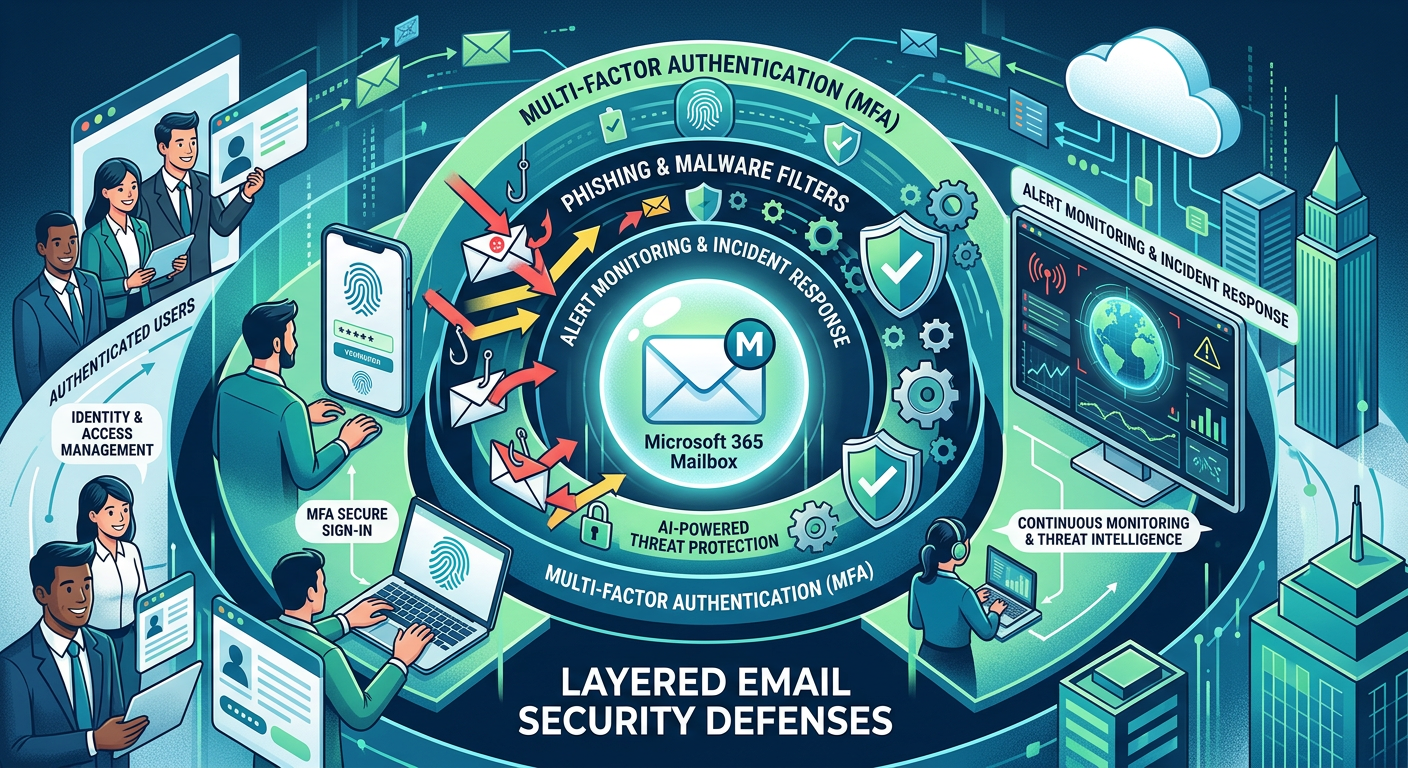
The most reliable way to reduce risk is to stack controls. No single feature stops every attack, but several aligned protections make compromise much harder.
1. Enforce multifactor authentication everywhere
If an attacker steals a password, multifactor authentication can stop the takeover. Require MFA for all users, especially executives, finance staff, and anyone with admin access. Prefer stronger methods like authenticator apps or hardware keys when possible.
2. Turn on modern anti-phishing protections
Microsoft 365 can detect impersonation and suspicious sign-in behavior, but only if the right policies are enabled and tuned. Use anti-phishing policies for display-name spoofing, domain lookalikes, and high-risk sender patterns.
3. Protect against malicious inbox rules
Attackers often hide in plain sight by creating inbox rules that forward or delete messages. Review mailbox auditing, alert on new forwarding rules, and restrict automatic forwarding to external addresses.
4. Limit admin permissions
The fewer people who can change security settings, the better. Use role-based access, separate admin accounts, and just-in-time privilege where possible. That reduces the blast radius if one account is compromised.
5. Train users to verify payment changes
Technology helps, but people still approve the final step. Finance and operations teams should verify bank changes through a separate channel, such as a known phone number or approved portal, before any payment goes out.
Why managed Microsoft 365 support matters
For many businesses, the problem is not a lack of tools. It is a lack of time, tuning, and follow-through. Security settings drift, alerts pile up, and policies get applied unevenly across users and devices.
That is why many regulated organizations choose Microsoft 365 Managed Services instead of trying to maintain everything alone. A managed approach helps you keep protections current, monitor risky activity, and respond faster when something looks off.
If your team also needs secure access to systems and files, combining M365 with Managed Virtual Desktops (VDI) can reduce endpoint risk and keep sensitive work in a controlled environment.
Practical controls that reduce BEC risk fast
Require conditional access
Conditional access can limit logins by location, device compliance, or risk level. That makes it harder for stolen credentials to be used from an unfamiliar device or country.
Use secure email filtering
A strong filter layer can block obvious phishing, spam, and malware before they reach inboxes. Pair that with Email Security & Encryption so sensitive messages are protected in transit and at rest.
Monitor for suspicious sending behavior
Sudden spikes in outbound mail, strange reply patterns, or unexpected delegation changes deserve attention. Logging and alerting help you catch anomalies before they become breaches.
Keep business processes off email when possible
The less your team relies on email for high-risk approvals, the better. Use documented workflows for invoices, payroll changes, and legal approvals, especially when money or PHI is involved.
How Armour Cloud helps regulated teams stay protected

For healthcare, finance, legal, and multi-location businesses, the goal is not just security. It is security that fits compliance, performance, and support requirements without driving costs out of control.
Armour Cloud provides affordable HIPAA-compliant cloud hosting and cost-effective managed cloud services from Arizona-based data centers. That local footprint can help lower latency, simplify support, and reduce the hidden complexity that often raises the total cost of national cloud platforms.
You can also pair secure hosting with HIPAA Compliant Managed Cloud Hosting and Private Cloud Hosting when you need tighter control over sensitive workloads and predictable billing.
People also ask
What is the biggest risk in business email compromise?
The biggest risk is usually trust. Attackers use familiar names, urgent language, and realistic email threads to trick employees into sending money, sharing credentials, or approving risky changes.
Is Microsoft 365 secure enough on its own?
Microsoft 365 is a strong platform, but security depends on configuration, monitoring, and user behavior. Most organizations need layered policies, MFA, training, and ongoing administration to stay protected.
How do inbox rules help attackers?
Attackers may create forwarding or deletion rules to hide replies, suppress alerts, or route sensitive mail to another account. Reviewing mailbox rules regularly helps catch this tactic early.
Should finance teams use a separate approval process?
Yes. High-risk actions like wire transfers, vendor bank changes, and payroll updates should use out-of-band verification. That simple step can stop many BEC attempts.
Can VDI improve email security?
Yes. VDI can reduce the risk from compromised endpoints by keeping work inside a managed environment. It is especially useful for remote teams handling sensitive data.
Secure your email environment before the next attack
The best time to tighten email security is before an attacker tests your controls. If you want help with preventing business email compromise M365, start with a review of your policies, alerts, MFA coverage, and user workflows.
Call (602) 529-3435 or contact Armour Cloud to discuss secure Microsoft 365 management, email filtering, and compliant cloud options for your team.
Conclusion
Business email compromise succeeds when teams trust too quickly and controls are too loose. With the right Microsoft 365 settings, user verification steps, and managed oversight, you can reduce that risk significantly.
For regulated organizations, the strongest path is a layered one, secure Microsoft 365, clear approval processes, and local support from a provider that understands compliance and uptime. That is how you protect both your inbox and your business.
About Armour Cloud
Armour Cloud is a Phoenix-based provider of secure, compliant cloud hosting and managed IT solutions for regulated industries. Armour Cloud delivers high-performance infrastructure built on Arizona data centers, offering low-latency, HIPAA-compliant hosting with 24/7 support.
We specialize in helping healthcare, finance, and legal organizations protect sensitive data, meet compliance requirements, and modernize their IT with scalable, managed cloud environments.
Our Top Services:
- Colocation
- Managed Desktop-as-a-Service (VDI)
- Managed Microsoft 365 Services
- Email Security & Encryption
- Secure WordPress Hosting
- Private Cloud Hosting
- HIPAA Compliant Cloud Solutions
Ready to Secure Your Cloud?
📞 Call (602) 529-3435 or Contact Armour Cloud to get started with a free consultation.