How to Improve WordPress Security for Safer Sites
WordPress powers a huge share of the web, which is exactly why it attracts so much attention from attackers. If your site handles client intake, forms, patient information, financial leads, or legal inquiries, security is not optional, it is part of your business risk management.
The good news is that you do not need a massive team to make real improvements. With the right habits, the right hosting setup, and a few smart controls, you can significantly reduce exposure and keep your site running smoothly.
Introduction
Improving WordPress security starts with understanding a simple truth, most breaches do not happen because WordPress itself is weak. They happen because of outdated plugins, poor password hygiene, weak hosting, or missed maintenance.
That is why many regulated organizations pair WordPress with secure infrastructure and managed support. If you are evaluating Secure WordPress Hosting or broader HIPAA Compliant Managed Cloud Hosting, the goal is the same, reduce risk without adding operational complexity.
Start With the Hosting Layer
A secure site is only as strong as the environment it runs in. Shared, unmanaged hosting can expose you to noisy neighbors, inconsistent patching, and limited visibility when something goes wrong.
For regulated teams, a private or managed environment usually offers better control, stronger isolation, and more predictable performance. Armour Cloud’s Arizona-based infrastructure is built to support compliance-driven businesses that need dependable uptime, lower latency, and a better total cost of ownership than many national providers.
Why hosting matters so much
- Better isolation helps reduce cross-site risk.
- Managed patching reduces the chance of forgotten updates.
- Local support can shorten response times during incidents.
- Predictable billing helps avoid surprise usage costs.
Keep WordPress, Themes, and Plugins Updated
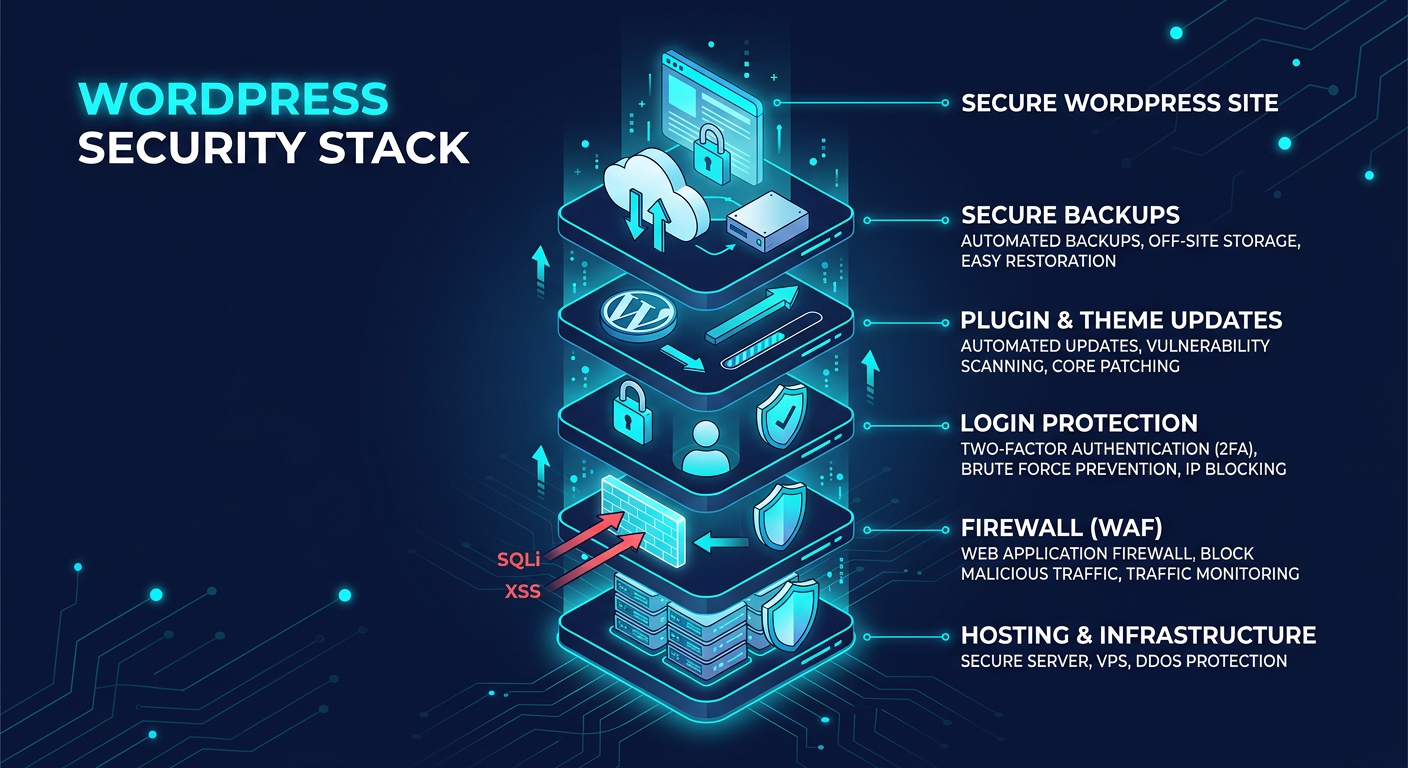
Outdated software is one of the most common ways attackers get in. The core platform, your theme, and every plugin should be reviewed regularly, because even one abandoned extension can become a liability.
A practical update routine looks like this:
- Review updates weekly.
- Remove plugins you no longer use.
- Test major updates in staging first.
- Use only reputable plugins with active maintenance.
If your team also manages multiple platforms, this discipline should extend beyond WordPress. The same operational mindset applies to Microsoft 365 Managed Services and Email Security & Encryption, where patching, permissions, and policy management all matter.
Lock Down Admin Access
Weak login controls are still a major problem. If an attacker guesses an admin password or reuses a stolen one, they can move fast.
Here is what helps most:
- Use unique, long passwords.
- Turn on multi-factor authentication.
- Limit admin accounts to only the people who truly need them.
- Change default usernames if they are too obvious.
- Disable or restrict login attempts.
For organizations that support remote staff, Managed Virtual Desktops (VDI) can also help reduce endpoint risk by keeping sensitive work in a controlled environment instead of on unmanaged devices.
Reduce Plugin and Theme Risk
Plugins are useful, but they are also one of the biggest attack surfaces in WordPress. Every extra tool adds code, permissions, and maintenance overhead.
A safer approach is to keep your stack lean:
- Use fewer plugins.
- Choose vendors with strong support histories.
- Avoid nulled or pirated themes.
- Delete unused themes instead of leaving them inactive.
- Audit plugin permissions and data access regularly.
This is where secure planning and strong operations pay off. A well-managed site on Private Cloud Hosting can be easier to secure than a sprawling setup with too many moving parts.
Back Up Everything, Then Test the Restore
Backups are not just a safety net, they are part of your recovery plan. A backup that cannot be restored quickly is not much help during an incident.
Best practices include:
- Keep automated daily backups.
- Store backups offsite.
- Retain multiple restore points.
- Test recovery on a schedule.
If your site supports compliance-sensitive workflows, backups should be tied into broader continuity planning. That is especially important for healthcare, finance, and legal teams that cannot afford extended downtime.
Add Security Controls That Actually Help
A few practical protections can go a long way:
- Use a web application firewall.
- Enforce HTTPS everywhere.
- Disable file editing in the WordPress dashboard.
- Hide or restrict sensitive configuration files.
- Set proper user roles and capabilities.
These controls are not flashy, but they stop many of the most common attacks before they become incidents. They also make it easier to maintain clean, auditable operations across your website and supporting systems.
Don’t Ignore Email and User Behavior
Many WordPress compromises start outside WordPress. A phishing email leads to a stolen password, which leads to a compromised admin account, which leads to a site breach.
That is why security should include the full user journey, not just the website. Strong Email Security & Encryption and filtering help reduce the chance that a bad message becomes a site problem.
How Armour Cloud Supports Secure WordPress
If you want affordable WordPress security without giving up compliance or performance, managed infrastructure is often the smarter choice. Armour Cloud focuses on cost-effective, compliant hosting for organizations that need privacy, uptime, and responsive local support.
That can mean fewer hidden fees, less operational burden, and a better fit than large national cloud providers for regulated teams that prefer a hands-on partner.
For businesses that want a broader solution, Hybrid Cloud Solutions can also help balance flexibility, security, and control.
Frequently Asked Questions
What is the most important first step to improve WordPress security?
Start with updates, strong passwords, and multi-factor authentication. Those three steps remove a lot of easy attack paths right away.
How often should I update plugins?
Check for updates weekly, and apply critical fixes as soon as practical. If possible, test major updates in a staging environment first.
Is shared hosting safe for WordPress?
It can work for low-risk sites, but regulated organizations usually benefit from more isolation, better monitoring, and managed support.
Do I really need backups if my host already protects the site?
Yes. Backups are your recovery tool if something slips through. Always keep your own tested restore process.
Can WordPress be secure enough for healthcare or finance?
Yes, when it is hosted and managed correctly. Security depends on the full setup, including access controls, hosting, monitoring, and maintenance.
What helps more, a plugin or secure hosting?
Both matter, but secure hosting provides the foundation. If the environment is weak, plugins alone will not compensate.
Strengthen Security Without Slowing Down Your Team
The best WordPress security strategy is the one your team can actually maintain. Keep the stack lean, control access carefully, patch consistently, and host the site in an environment built for reliability.
If you want help improving your posture while keeping costs predictable, call (602) 529-3435 or visit Armour Cloud contact page to talk through secure hosting options.
About Armour Cloud
Armour Cloud is a Phoenix-based provider of secure, compliant cloud hosting and managed IT solutions for regulated industries. Armour Cloud delivers high-performance infrastructure built on Arizona data centers, offering low-latency, HIPAA-compliant hosting with 24/7 support.
We specialize in helping healthcare, finance, and legal organizations protect sensitive data, meet compliance requirements, and modernize their IT with scalable, managed cloud environments.
Our Top Services:
- Colocation
- Managed Desktop-as-a-Service (VDI)
- Managed Microsoft 365 Services
- Email Security & Encryption
- Secure WordPress Hosting
- Private Cloud Hosting
- HIPAA Compliant Cloud Solutions
Ready to Secure Your Cloud?
📞 Call (602) 529-3435 or Contact Armour Cloud to get started with a free consultation.