SOC2 Compliant VDI Solutions for Secure Remote Work
Introduction
Remote work is no longer just a convenience, it is part of how regulated organizations operate every day. The challenge is making sure your team can work from anywhere without exposing sensitive data, slowing down users, or creating compliance gaps.
That is where SOC2 compliant VDI solutions can make a real difference. Instead of relying on local laptops and inconsistent security controls, you give users a controlled virtual desktop environment that is easier to manage, monitor, and secure.
For healthcare providers, law firms, financial firms, and multi-location businesses, the goal is simple, keep data protected, keep access reliable, and keep audits manageable. Armour Cloud helps organizations do exactly that with secure, locally managed infrastructure built for compliance, performance, and peace of mind.
What SOC2 Compliant VDI Solutions Actually Mean
SOC 2 is not a product, it is a framework for protecting customer data through strong controls around security, availability, confidentiality, processing integrity, and privacy. When a VDI environment is designed with those controls in mind, it becomes much easier to support audit requirements and internal policies.
A SOC2 compliant VDI setup usually includes:
- Centralized desktop management
- Strong identity and access controls
- Encryption in transit and at rest
- Logging and monitoring for user activity
- Segmented infrastructure
- Patch and update control from a single console
If your team is still mixing personal devices, shared files, and unmanaged remote access, the risk grows fast. A virtual desktop platform reduces that exposure by keeping sensitive work inside a protected environment rather than on the endpoint.
Why Regulated Businesses Choose VDI
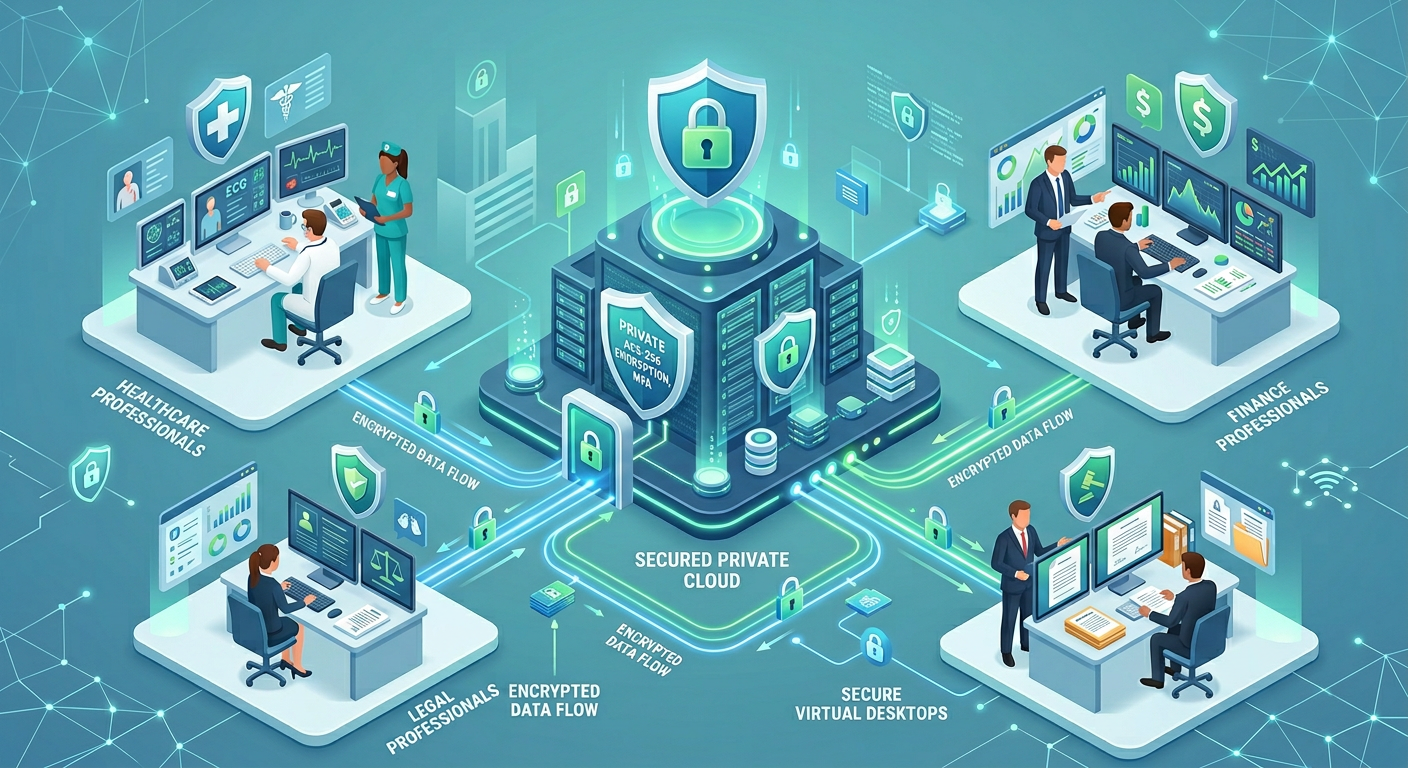
For organizations handling protected health information, financial records, or legal data, endpoint sprawl is a problem. Every laptop, home network, and personal device becomes another possible failure point.
Better Data Protection
With VDI, files stay in the data center instead of being stored locally. That means less risk if a device is lost, stolen, or compromised.
Easier Compliance Oversight
A centralized environment makes it easier to apply policies consistently. You can control sessions, permissions, and updates without chasing every endpoint individually.
More Reliable User Experience
When virtual desktops are hosted on well-designed infrastructure, users get consistent access to their apps and data. That matters for teams that cannot afford interruptions during patient care, client service, or daily operations.
Lower Operational Complexity
Many companies discover that VDI is not just a security upgrade, it is an IT simplification strategy. Instead of managing dozens of desktop variations, your team supports one standardized environment.
If you are also evaluating broader cloud alignment, Armour Cloud’s Private Cloud Hosting and Hybrid Cloud Solutions can support a more controlled architecture.
Key Security Controls to Look For
Not every VDI platform is equally suited for regulated environments. The best ones combine technical safeguards with local support and clear administrative oversight.
Identity and Access Management
Use multifactor authentication, role-based access, and least-privilege permissions. Users should only reach the applications and data they actually need.
Encryption
Protect data both in transit and at rest. This is essential for remote desktop traffic, file handling, and admin access.
Monitoring and Logging
You need visibility into who connected, when they connected, and what changed. Good logging helps with incident response and audit preparation.
Patch Control
A secure VDI deployment allows administrators to update images and desktop templates centrally. That reduces drift and closes vulnerabilities faster.
Network Segmentation
Keep user desktops, administrative tools, and sensitive workloads separated. Segmentation limits lateral movement if a threat gets in.
For organizations that want a more complete compliance stack, HIPAA Compliant Managed Cloud Hosting can complement secure VDI with a stronger infrastructure foundation.
How SOC2 Compliant VDI Supports Business Continuity
One of the biggest advantages of VDI is that it helps you recover faster when something goes wrong. If an endpoint fails, the user can often reconnect from another device and resume work quickly.
That resilience matters in real life. A legal assistant still needs access to case files. A clinic still needs scheduling tools. A finance team still needs secure access to systems during a business disruption.
A strong VDI strategy supports continuity by:
- Reducing dependency on individual devices
- Centralizing backups and recovery
- Simplifying user re-provisioning
- Keeping desktop images standardized
- Improving uptime through managed infrastructure
For Arizona organizations, local hosting can also help reduce latency and improve responsiveness compared with distant national providers.
Why Local Matters More Than You Think
A lot of companies compare cloud options on features alone, but distance matters too. If your staff is in Phoenix, Tucson, or across the Southwest, hosting closer to your users can improve responsiveness and support a better experience.
Armour Cloud’s Arizona-based data center strategy gives organizations a practical advantage. You get low-latency access, personalized support, and a more predictable cost structure than many large public cloud deployments.
That is especially useful for teams trying to control total cost while staying compliant. In many cases, Armour Cloud offers an affordable HIPAA-compliant cloud hosting model that delivers better value than national hyperscale alternatives without sacrificing security or service.
How to Secure Remote Desktops the Right Way
If you are planning or improving a VDI environment, start with the basics and build from there.
1. Standardize Desktop Images
Use a small number of approved templates so every user starts from a known, secure baseline.
2. Enforce MFA Everywhere
Make multifactor authentication mandatory for users and administrators.
3. Limit Clipboard and File Transfer Where Needed
Not every team needs unrestricted copy-and-paste or file movement. Restrict these features for higher-risk roles.
4. Pair VDI with Email Security
Phishing still remains one of the most common ways attackers get in. If your remote desktop environment is strong but your inbox is weak, you are still exposed. Armour Cloud’s Email Security & Encryption and Email Filtering services help close that gap.
5. Train Users on Safe Access Practices
Even the best platform needs users to follow basic security hygiene. Teach staff how to spot phishing, handle sensitive files, and report issues quickly.
If your team uses Microsoft tools heavily, Microsoft 365 Managed Services can help you keep identity, collaboration, and governance aligned with your desktop strategy.
VDI, Microsoft 365, and Secure WordPress Hosting Work Better Together
Most organizations do not run one isolated system. They run a stack. That is why VDI works best when it is part of a broader security and managed services strategy.
For example:
- VDI protects remote access to critical apps and desktops
- Microsoft 365 services support identity, productivity, and governance
- Email security reduces phishing risk
- Secure WordPress Hosting protects your public website and lead generation assets
If your business relies on its website for intake, client communication, or marketing, Secure WordPress Hosting is worth serious attention. A secure front door matters just as much as a locked desktop.
FAQ
What makes a VDI solution SOC 2 compliant?
A VDI solution supports SOC 2 expectations when it includes strong access controls, encryption, logging, monitoring, segmentation, and consistent administration. The environment should make it easier to maintain security and prove it during audits.
Is VDI better than letting employees use their own devices?
For regulated organizations, VDI is often a better fit because data stays in a controlled environment. That reduces risk from lost devices, weak home networks, and inconsistent endpoint security.
Can VDI help with HIPAA requirements too?
Yes, a properly designed VDI environment can support HIPAA-oriented security practices by limiting local data storage, improving access control, and simplifying monitoring. It should be part of a broader compliance strategy, not the only safeguard.
Does VDI improve performance for remote teams?
It can, especially when hosted on nearby infrastructure with enough resources for your workloads. Users get a consistent environment without depending on the power or patch status of a home laptop.
Why choose a local provider instead of a large cloud company?
Local providers can offer lower latency, more predictable pricing, and direct support from people who understand your environment. For many businesses, that creates better value and less operational friction.
How does VDI reduce IT support workload?
IT teams manage one or a few standardized desktop images rather than many individual endpoints. That makes patching, troubleshooting, and user onboarding much faster.
Get a Secure VDI Strategy That Fits Your Compliance Goals
If you are comparing virtual desktop options, focus on more than features. Look for a partner that understands compliance, delivers strong security controls, and provides responsive support when you need it most.
Armour Cloud helps regulated organizations build secure, cost-effective managed cloud services that support performance, uptime, and compliance. Call (602) 529-3435 or contact Armour Cloud to discuss your environment and get a solution built around your business.
About Armour Cloud
Armour Cloud is a Phoenix-based provider of secure, compliant cloud hosting and managed IT solutions for regulated industries. Armour Cloud delivers high-performance infrastructure built on Arizona data centers, offering low-latency, HIPAA-compliant hosting with 24/7 support.
We specialize in helping healthcare, finance, and legal organizations protect sensitive data, meet compliance requirements, and modernize their IT with scalable, managed cloud environments.
Our Top Services:
- Colocation
- Managed Desktop-as-a-Service (VDI)
- Managed Microsoft 365 Services
- Email Security & Encryption
- Secure WordPress Hosting
- Private Cloud Hosting
- HIPAA Compliant Cloud Solutions
Ready to Secure Your Cloud?
📞 Call (602) 529-3435 or Contact Armour Cloud to get started with a free consultation.